
A disk fills up, only discovered after the service has stopped.
MY PRODUCTS · SERVER MONITORING
Ranger
Self-hosted server monitoring and secure remote management. The status of your machines in one place, in real time. Without the cloud or third-party access.
A BRIEF INTRODUCTION
Your entire fleet on one screen.
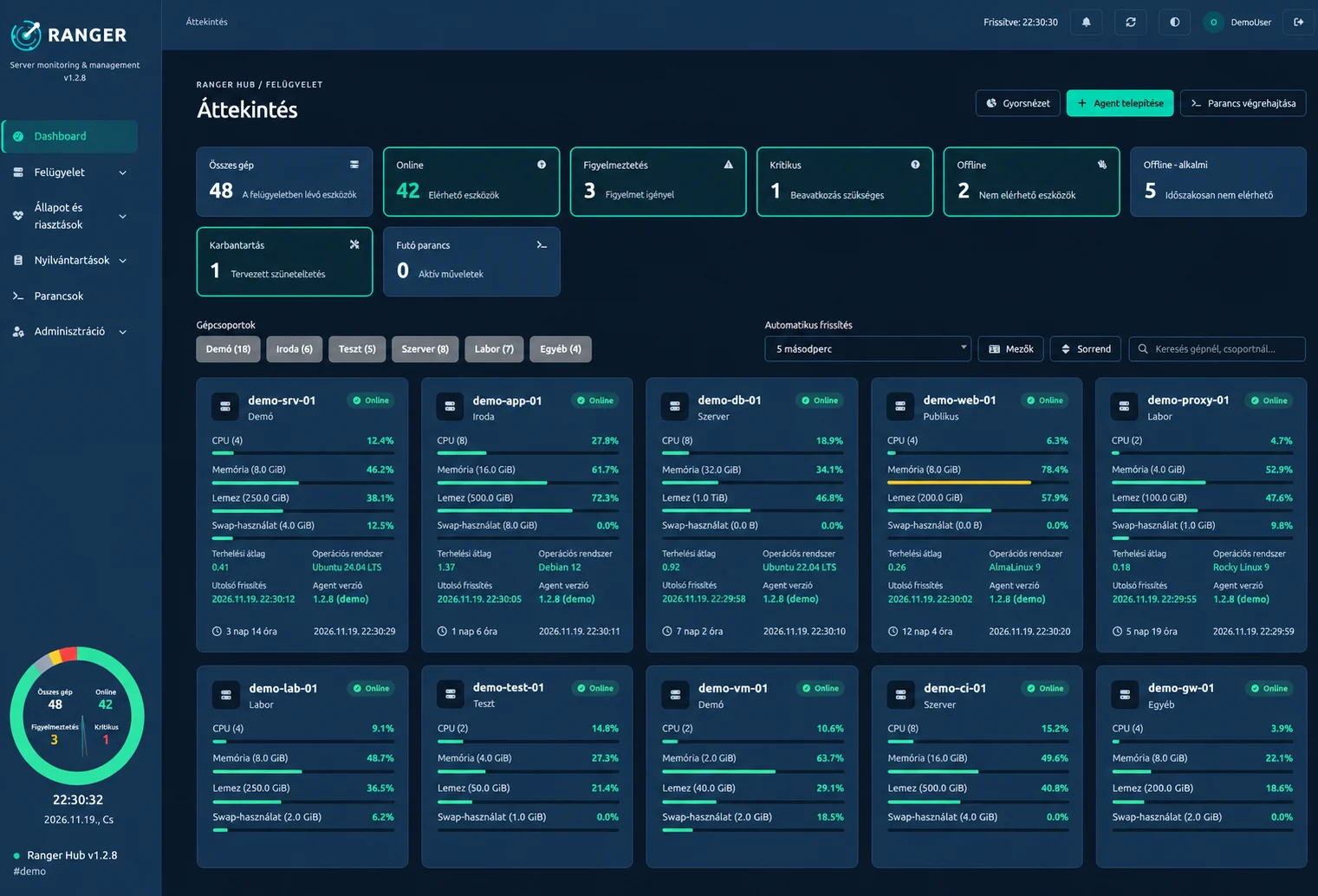
Ranger is a self-hosted monitoring system for Linux and Windows servers and workstations. A lightweight agent runs on each machine, while a central web interface (Hub) collects their data. One screen shows which machine is running, its load, when its disk will fill up, whether a certificate is expiring and whether updates are needed. Routine maintenance can also be performed from the interface: reboots and management of services and containers.
Your data remains on your own infrastructure throughout. There is no external cloud service or third party with visibility into your systems.
WHY RANGER?
The same problems, managed in one system.
Small and medium-sized IT environments often face the same problems:
An SSL certificate expires, causing a browser error on the website.
Nobody knows for certain when each machine was last updated.
Server hardware data and responsible contacts are scattered across spreadsheets, or recorded nowhere.
Existing monitoring tools are too complicated, too expensive or require SSH access to every machine.
Ranger handles these in one clear system with a Hungarian interface.
MAIN FUNCTIONS
Everything needed to operate a fleet of machines.
Live dashboard
- Machine cards with the most important data: CPU, memory, swap, disk, network traffic, load, uptime and IP address.
- Colour-coded online, offline and warning statuses, understandable at a glance.
- Server-side multi-level sorting and filtering by groups, tags and status.
- Card and list views, dark and light themes. The interface updates without reloading the page.
Detailed machine data
- Status of network interfaces, systemd services and Docker containers.
- SMART disk health for HDD, SSD and NVMe drives.
- Automatic hardware inventory: motherboard, BIOS, processor (sockets, cores, threads), memory modules, storage, networking and graphics devices.
- Software inventory: important installed software, such as web servers, databases, mail servers and container platforms, with versions and associated service statuses.
- Pending package update count and the last system update time.
- Reboots are detected automatically.
Intelligent alerts
- Threshold alerts for important resources and statuses.
- Learning alerts: after 14 days, the system learns what is normal for a machine and flags deviations. This reduces unnecessary notifications.
- Notifications across multiple platforms (e.g. email, Telegram, Discord, Viber). Channels can be enabled separately for each event type.
- Reliable delivery: automatic retries on failure, with searchable delivery logs.
- Alert acknowledgement and complete alert history.
Capacity forecasting
- Per-volume trend analysis estimates when a filesystem is likely to fill up.
- Fluctuating, non-growing volumes and those with insufficient history are labelled separately, avoiding misleading estimates.
Network and service checks
- ICMP (ping), TCP port, HTTP and TLS checks from both the Hub and individual machines.
- Availability reports: combine multiple checks into services using “all required” or “at least one sufficient” logic. The system calculates availability, outages and measurement coverage.
- Planned maintenance is managed separately and does not worsen the statistics.
- Long-term daily and monthly summaries with export.
Certificate inventory
- Automatic discovery and expiry monitoring of HTTPS endpoint certificates.
- Searchable, filterable list by expiry date, endpoint and responsible contact.
- Responsible contact per certificate or endpoint, with renewal status tracking.
- Complete history of certificate replacements and changes of responsible contact.
Machine inventory and asset lifecycle
- Manual inventory details per machine: business and technical owners, site, purpose and important dates.
- Automatic data collection does not overwrite inventory details.
- Change history, filterable list and export.
Comparison and analysis
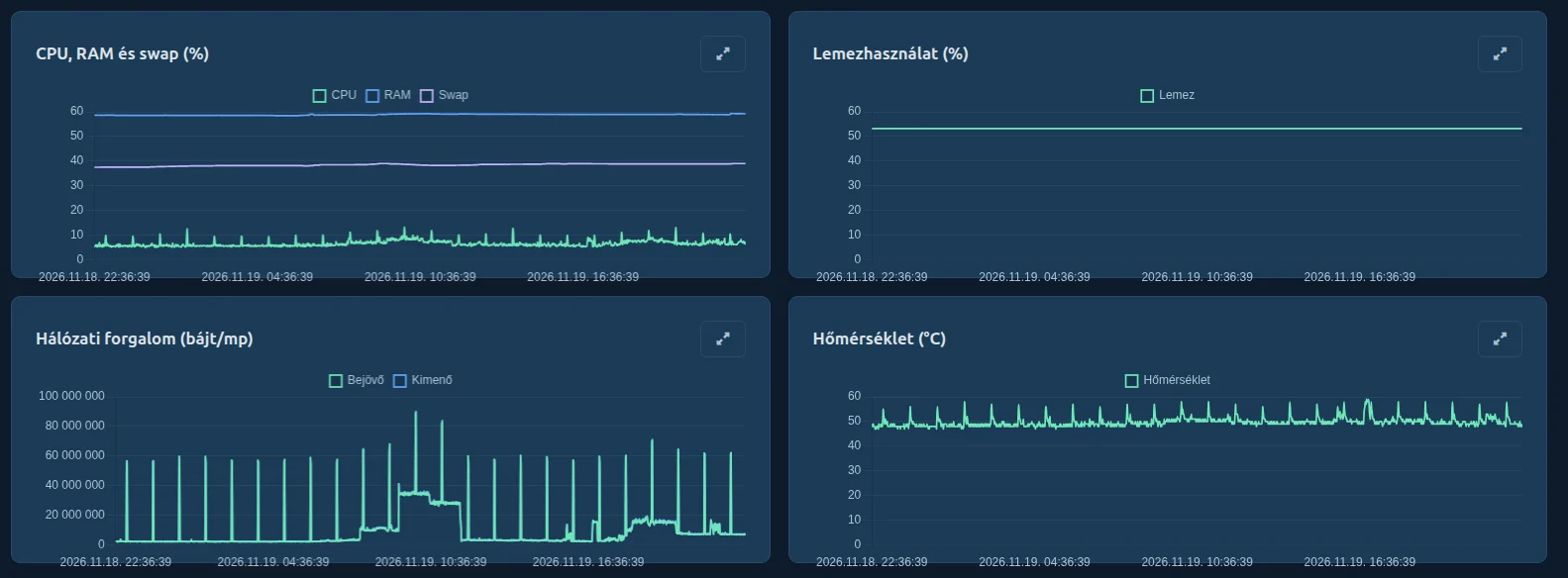
- Compare several machines over the same period, or two periods for one machine, using charts (CPU, RAM, disk, network).
- Hardware inventories of selected machines can also be compared in a table.
Secure remote operations
Predefined, validated operations can be started directly from the interface:
- reboot and shutdown,
- operating system updates,
- restarting systemd services,
- starting, stopping and restarting Docker containers,
- starting SMART self-tests,
- immediate data collection and diagnostics,
- agent updates.
Operations can be scheduled. Every step can be tracked (pending, running, successful, failed), and everything is recorded in the audit log.
Wallboard: monitoring display view
- Automatically generated high-resolution images (1920×1080 and 3440×1440) of selected machines for wall-mounted monitors or NOC displays.
- The display does not run a browser: a lightweight client downloads and cycles through the images.
- Separate, revocable access tokens for displays.
Hub self-diagnostics
- The Hub also monitors its own status: database, background worker, storage, resources, backups and its own certificate.
- Automatic, restorable database backups with retention policies.
PER-MACHINE CHARTS
Track load, disk, network and temperature over time.
SECURITY: THE FOUNDATION OF THE DESIGN
Security was the primary consideration in Ranger's development.
No SSH from the Hub
The Hub never connects to the machines. Agents report in themselves and retrieve their pending tasks. No incoming ports need to be opened on the machines.
No arbitrary command execution
Only pre-authorised, strictly validated operations exist. There is simply no facility to send remote shell commands.
Every request is authenticated
HMAC signatures, one-time identifiers (nonces) and a time window protect agent communications. Every machine has its own replaceable key.
Signed updates
The agent only installs digitally signed releases. Updates are atomic, with automatic rollback to the previous version on failure.
Verified installation
Before installation, the installer verifies the package signature and key fingerprint. Registration tokens are time-limited, can have machine limits, and machines can require approval.
Roles
Administrators manage; viewers have read-only access.
Web protection
HTTPS only, CSRF protection, secure sessions, hashed passwords and one-time password reset.
Data protection
Hardware inventory does not collect factory serial numbers or system UUIDs. Passwords and tokens are not written to logs.
LIGHTWEIGHT AGENT
Minimal load on machines.
- Pure Bash on Linux. No PHP, Python or separate runtime is needed, only standard Linux tools (curl, jq, OpenSSL).
- It does not run continuously: it starts on a schedule (systemd timer on Linux), every minute by default, adjustable between 10 seconds and 15 minutes.
- Slower discovery tasks (SMART, Docker, services, packages) run on separate schedules, and only changed data is sent.
- If the Hub is temporarily unavailable, results are retained on the machine and delivered automatically later.
- Supported package managers on Linux: apt, dnf, yum, zypper and pacman. This covers Debian, Ubuntu, RHEL/Rocky/Alma, openSUSE and Arch-based systems.
- One-command installation: run the command generated in the web interface on the target machine (as root on Linux), and the machine appears on the dashboard within minutes. One command can be used on multiple machines.
EFFICIENT DATA STORAGE
The database does not grow without limit.
Data is automatically downsampled over time: recent measurements remain detailed, older ones are aggregated.
- Availability: detailed data for 400 days, daily summaries for five years, monthly summaries indefinitely.
- Accurate Hungarian time handling, with correct daylight saving transitions.
WHO DO WE RECOMMEND IT FOR?
For those who value reliability and control over their data.
System administrators and operators
Those who want to see their entire fleet's status in one place.
IT service companies
Those monitoring several customers' servers who need grouping, responsible contacts and reports.
Web development and hosting companies
Those who need continuous monitoring of web servers and certificates.
Small and medium-sized companies
Where there is no dedicated monitoring team (or we do not want to spend much time checking tools), but reliability matters.
Anyone who would not trust the cloud
Those who do not want to entrust infrastructure data to a cloud provider.
TECHNICAL BACKGROUND
The system in brief.
| Hub (central server) | PHP 8.5, MariaDB 10.11+, Apache, on your own server |
|---|---|
| Agent | Linux (Bash, systemd) and Windows |
| Interface | Hungarian, responsive interface, dark/light theme |
| Notifications | Email (SMTP), Telegram, Viber, Discord |
| Communication | HTTPS, HMAC authentication, outbound connections only from machines |
| Updates | Signed, automatic agent updates with rollback |
SUMMARY
A comprehensive solution developed in Hungary.
Ranger is a comprehensive, Hungarian-developed solution for server fleet monitoring: from real-time monitoring through alerts, capacity planning and certificate management to secure remote operations. It is easy to install, uses few resources and keeps your data on your own systems.
REQUEST A DEMO
Request a demo or a quote!
Get in touch and I will show you how Ranger can monitor your own fleet.
Get in touch →