Individual developers and small teams
Those who use coding AI agents but want to see their work organised in one place.

MY PRODUCTS · AI DEVELOPMENT WORKSPACE
A web workspace for Codex and Claude Code: start, monitor and resume development tasks from your browser, on your own server.
IN BRIEF
Hephaestus is a self-hosted web application for using server-based AI development agents (OpenAI Codex and Anthropic Claude Code) from a browser, in conversations organised by project. Send a task, and the application works in the project directory while you see responses and tool calls live. You can resume where you left off later, even from your phone.
Hephaestus grew out of my own approach to using AI agents in development: thoughtfully, with verified results.
It complements your development environment with a convenient, persistent and clear interface around the agents: no terminal, no SSH session to disconnect, and no lost history.
WHO IS IT FOR?
Those who use coding AI agents but want to see their work organised in one place.
Those who need separate conversations and histories for each project.
Those who keep their code mounted on a server and do not want to log into the machine every time.
Those who want to start or check a task from their phone, even during a long run, or simply revisit an earlier process.
WHAT CAN IT DO?
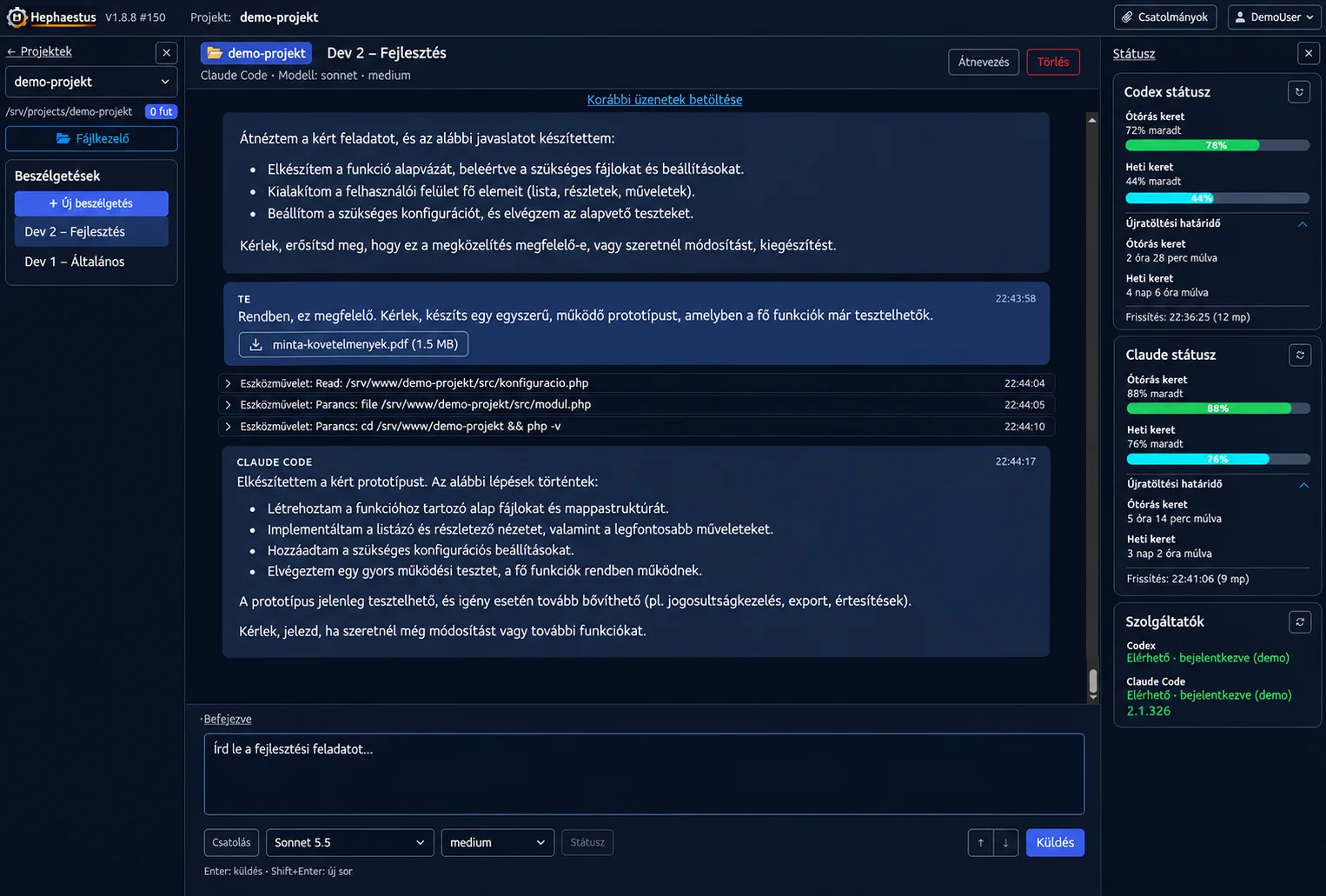
Choose between Codex and Claude Code for each conversation (other AI agents can also be integrated), and configure the model and reasoning effort.
Responses arrive in real time, word by word, together with tool calls (commands and file operations). You can continue writing your next message during output; the text field always remains editable.
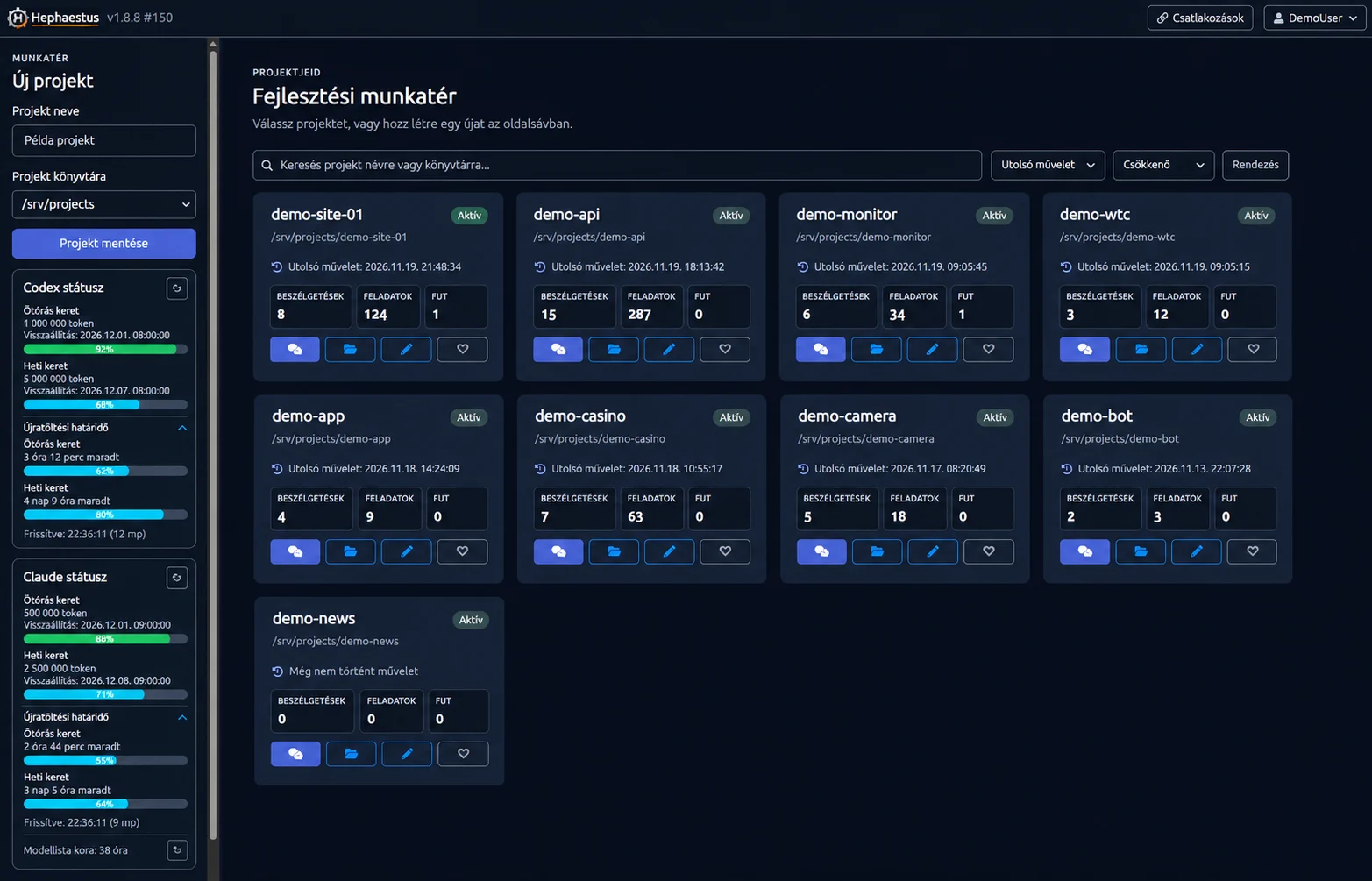
Two cards show the Codex and Claude subscription quotas, separately for the five-hour and weekly limits:
A separate Providers card shows whether Codex and Claude are available and logged in.
Attach an image, PDF, text file, source code or ZIP archive to a message, including by dragging or pasting. The server checks file type from content rather than extension. Previous attachments can be managed on a shared page with storage statistics.
Each project has a file manager: browse, edit text files (with conflict protection against overwriting other changes), create files or folders, rename, delete, upload and download.
The project list is searchable and sortable by name, creation or last action. Cards show conversation and task counts and whether a task is currently running.
The entire interface also works on phones, with a slide-out sidebar and compact message list. A dark appearance that is easy on the eyes.
THE CONVERSATION INTERFACE
HOW DOES IT WORK?
The browser never connects directly to the agent: communication takes place between the PHP application and a control service accessible only on the local machine.
SECURITY AND CONTROL
Passwords stored with password_hash, limited login attempts, email password reset (SMTP), eight-hour sessions.
CSRF protection for every state-changing action, secure cookie settings.
Only verified directories within allowed roots can be used. For mounted directories, the active mount is checked before writing.
The controller listens only on the local machine and is token-protected. Claude processes receive a restricted environment; CLI flags cannot be passed from the browser.
The interface uses local Bootstrap and jQuery files, without a CDN.
TECHNOLOGY
PHP 8.5, MariaDB, nginx or Apache.
A local Node.js controller for Codex App Server and Claude Code CLI.
Bootstrap 5, jQuery, Server-Sent Events for live updates.
Hungarian interface and documentation; the application uses the Hungarian time zone and date format.
WHAT YOU SHOULD KNOW
Hephaestus does not provide AI. You need a subscription or access to Codex and/or Claude Code and/or another coding AI agent; these consume the quota.
Agents work autonomously in the project directory, with the controller user's permissions and without approvals. Point them at a directory where you are comfortable with this, and use version control.
Some Claude models (for example Fable) may require usage credits in addition to the subscription. The application indicates this.
Claude quota data comes from runs and a small manual test request (the Claude CLI provides no separate query), so the card is not always real-time.
INSTALLATION IN BRIEF
FREQUENTLY ASKED QUESTIONS
Yes, you can choose per conversation. Only one task can run on the same project at a time, protecting files from conflicts.
The task continues on the server and results are stored in the database. Everything is there when you return.
Yes, the interface was designed for this too.
On your own server, in the database and configured attachment directory. The only external services are the APIs of Codex, Claude or other AI providers themselves.
TRY IT
Get in touch and we will discuss how it can fit your server and workflow.
Get in touch →This notice explains how the operator of the Orseolo.hu website (www.orseolo.hu) processes the personal data of visitors and people making enquiries. It has been prepared on the basis of Regulation (EU) 2016/679 of the European Parliament and of the Council (General Data Protection Regulation, GDPR), Act CXII of 2011 on the Right of Informational Self-Determination and on Freedom of Information (Infotv.), and Act CVIII of 2001 on electronic commerce services.
The nature and scope of processing do not require the appointment of a data protection officer. Data protection enquiries can be addressed to the controller using the contact details above.
The website currently uses no marketing or advertising cookies. The “Marketing” category in the cookie consent window allows you to decide in advance if such cookies are introduced.
The website uses cookies essential for operation without your consent (legal basis: legitimate interest, and storage necessary to provide the service under the Electronic Commerce Act). Statistical cookies are placed on your device only with consent.
| Name | Type | Purpose | Validity |
|---|---|---|---|
| csrfToken | cookie, necessary | protecting forms against forged requests (CSRF) | until the browser is closed |
| orseoloCookieConsent | local storage (localStorage), necessary | retaining the cookie consent decision and its time | until the decision is changed or deleted |
| orseoloAnalyticsVisitor | local storage (localStorage), statistical | linking a visitor's return visits | until consent is withdrawn or it is deleted |
| _ga, _ga_* | cookie, statistical (Google) | distinguishing visitors and measuring usage | up to two years by default |
You can change your decision at any time using “Cookie settings” in the footer. You can also delete or block cookies in your browser settings, but this may restrict some website functions.
The controller does not sell personal data or disclose it for advertising purposes. The following service providers are used in processing:
In response to requests from authorities, the controller may disclose data to the competent authority where required by law.
When Google Analytics is used, data may be transferred to the United States. Transfers take place with the safeguards provided by Chapter V GDPR (for example the EU–US Data Privacy Framework or standard contractual clauses). Without consent to statistical measurement, no such transfer occurs.
The controller protects personal data against unauthorised access, disclosure, alteration, deletion and destruction. The website uses encrypted HTTPS connections, the form has CSRF protection, internal directories and log files have no direct web access, and only the controller has access to the data.
Processing involves no automated decision-making or profiling concerning you.
The website is not intended for people under 16, and the controller does not knowingly collect their personal data.
You can exercise the following rights relating to processing using the controller's contact details above:
The controller responds to requests within at most one month of receipt (Article 12(3) GDPR). Information and actions are free of charge, except for manifestly unfounded or excessive requests.
If you believe the processing of your personal data infringes legislation, you can complain to the supervisory authority:
If your rights are infringed, you can also bring proceedings before a court. At your choice, proceedings may also be brought before the regional court with jurisdiction over your place of residence or habitual residence.
The controller may amend this notice when legislation or processing changes. The current version is available on this page together with its amendment date.
The controller (Szegedi Zoltán e.v., szegedi.zoltan@orseolo.hu) uses its own visitor measurement to track page views, link clicks, active browsing time and scroll depth. Measurement uses random identifiers stored in its own cookies. Data is stored in the operator's MariaDB database, with a default event-level retention period of 13 months.
The IP address is associated with the session. To determine the country, the server may send the public IP address to ipwho.is. Geographic reports display data aggregated by country.